
Starter, Standard, Express, Premium, Core Plan X2, Premium X4: the names on IPTV packages can make a simple purchase look complicated. Underneath the labels, every package on our pricing page comes down to two choices, how long you pay for and how many devices it covers, plus a handful of details that are the same whichever card you pick.
This guide decodes our IPTV packages name by name, with the prices exactly as our pricing page displayed them when we checked on 2 November 2026. It also explains what a package does not include, why the headline channel numbers on the cards deserve caution, and how to compare IPTV packages from other sellers without being steered by the biggest number. We sell these subscriptions ourselves, so weigh what follows with that in mind; the British IPTV Sub homepage gives an overview of the service.
Our IPTV Packages, Decoded Name by Name
Our pricing page groups the packages under five device tabs, from 1 Device to 5 Devices. Each card has a name, a length and a price. Laid out as a grid, the naming pattern becomes clear:
| Length | 1 device | 2 devices | 3, 4 or 5 devices |
|---|---|---|---|
| 1 month | Starter, £9.99 | Basic Plan X2, £18 | Not offered |
| 3 months | Standard, £23.99 | Core Plan X2, £44 | Standard X3 / X4 / X5 |
| 6 months | Express, £34.99 | Core Plan X2, £66 | Express X3 / X4 / X5 |
| 12 months | Premium, £49.99 | X2 Premium, £95 | Premium X3 / X4 / X5 |
The larger IPTV packages for three, four and five devices are priced as follows on the same date:
- 3 devices: Standard X3 (3 months) £61, Express X3 (6 months) £91, Premium X3 (12 months) £134.
- 4 devices: Standard X4 (3 months) £90, Express X4 (6 months) £124, Premium X4 (12 months) £182.
- 5 devices: Standard X5 (3 months) £103, Express X5 (6 months) £156, Premium X5 (12 months) £229.
Two quirks are worth knowing. On the 2-device tab, the 3-month and 6-month cards share the name “Core Plan X2”, so read the length on the card rather than the name. And the “X” number simply tells you the device count: Express X4 is the 6-month package for four devices.
Reading a Package Card in Thirty Seconds
Every card on our pricing page follows the same layout from top to bottom, and knowing where to look saves time when you compare IPTV packages side by side:
- The name at the top (Starter, Core Plan X2, Premium X3 and so on). Useful as a label, but the length and device tab tell you more.
- The length, written as “1 Month Subscription”, “3 Months Subscription” and so on. This is the figure to trust.
- The price, shown large. It is the price for the whole length, paid once.
- A number of days under the price. It should match the length; if a card ever shows a figure that disagrees with its name, ask before you order.
- The feature list. Mostly the same on every card; treat the large channel and film figures with the caution explained below.
- The button and the “One time payment” label. “Order Now” leads to checkout for one or two devices and to WhatsApp for three to five.
Read in that order, the card answers the only two questions that matter: how long, and for how many devices.
Choice One: How Long the Package Runs
Our IPTV packages come in four lengths, but not every length exists for every household size. One-month packages appear only on the 1-device and 2-device tabs; the 3-, 4- and 5-device tabs start at three months.
One month suits someone who wants to see the service working for a few weeks before committing, or who needs it for a short stay. Three months covers a season of viewing with room to change your mind afterwards. Six months is the middle ground for a household that is fairly sure but not yet ready for a year.
Twelve months is labelled Premium on every tab and is the one to choose once you know the service suits your TV, your broadband and your household. Our guide to the IPTV subscription for 12 months covers that decision in detail, including what to test before paying for a year.
Every card in our IPTV packages is labelled “One time payment”, and the pricing page does not describe automatic renewal. Whatever length you choose, note the date your service starts so the end of the package does not catch you out.
Choice Two: How Many Devices the Package Covers
The device count is the number in the tab you choose, and on the larger packages it is the X number in the name. The useful question is not how many televisions, sticks and phones you own, but how many are likely to be watching at the same time on a busy evening.
Our site does not spell out exactly how a device is counted, so if your household sits between two sizes, ask our team before ordering. The order route also changes with size: IPTV packages for one or two devices go through the online checkout, while the cards for three, four and five devices open a WhatsApp chat so the order is arranged with our team.
For a room-by-room way of counting screens, see our guide to IPTV for multiple devices. Getting this number right matters more than the package name, because it is the part of IPTV packages that decides whether everyone in the house can watch at once.
What Every Card Lists, Whatever the Package
Strip away the names and prices and our IPTV packages share most of their small print. Every card lists:
- An EPG. Each card mentions an available programme guide, so channels show what is on now and next inside a compatible player.
- Support. Every card lists round-the-clock support; our FAQ says help is given through WhatsApp or email until the service is running.
- A 7-day refund line. The cards mention a 7-day refund. Our refund policy page sets out the conditions: a full refund if an order has not been delivered or activated, contact within 48 hours if the login details do not work, and no refund once an account has been activated. Read that page before buying any of our IPTV packages.
- Device support. The cards say the service works on any or all devices; in practice that means any device that can run a compatible IPTV player app.
- Updates. Every card mentions free updates.
The 12-month Premium cards for one and two devices add a few extra lines, such as a “Premium Server” and “VIP” support. These are descriptions on the card rather than independently measured differences; if they matter to your decision, ask our team what they mean in practice before you choose.
Why the Channel Numbers on IPTV Packages Do Not Add Up
Headline channel and film counts are the loudest part of most IPTV packages, ours included, and they are the least useful for choosing. On our own pricing page the figures vary from card to card and tab to tab, and one card lists two different live-channel figures. That is a good reason not to treat any of these numbers as a promise.

A raw total also tells you very little about your own viewing. A household that watches a dozen channels regularly needs to know that those dozen are there, that the guide lines up with them and that they play smoothly in the evening. Hundreds of channels you will never open do not change that.
The better test is the free trial our homepage offers on WhatsApp. Use it to:
- Write down the channels you actually watch before the trial starts.
- Find each one in the player and check that it plays.
- Open the guide for those channels and compare it with what is on screen.
- Watch during a busy evening, not just a quiet afternoon.
- Try it on the device you will really use, not a spare one.
If all five checks pass, the size of the number on the card stops mattering. If they do not, no number will fix it. That applies to IPTV packages from any seller, not only ours.
What IPTV Packages Do Not Include
A package is a set of login details for a service. Several things you need to watch it are not part of it, and it is better to know that before you pay.
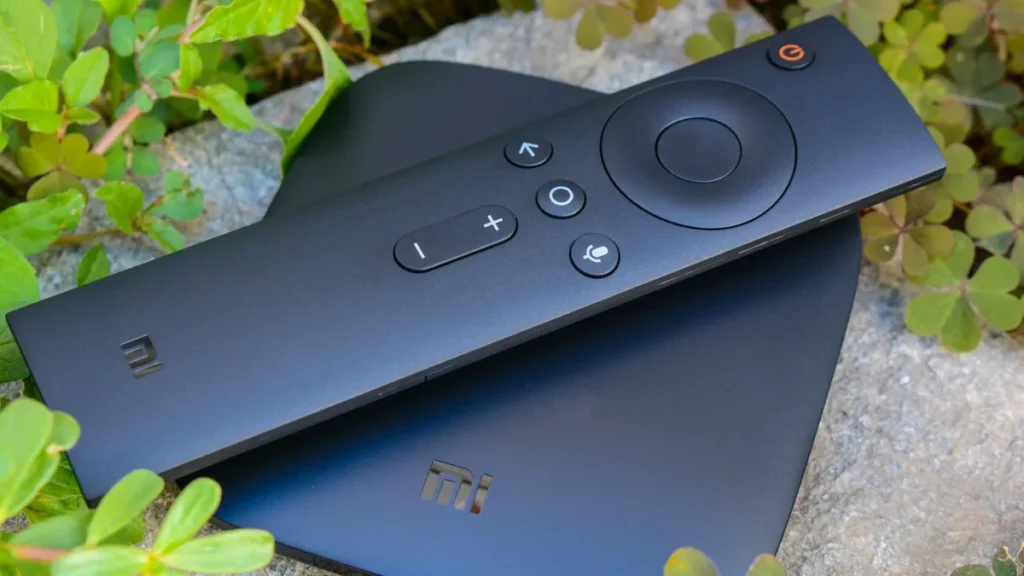
The device. None of our IPTV packages comes with a box, stick or TV. You need a smart TV, streaming stick, box, phone or tablet that can run a player app. If your TV is older or slow, our guide to the best device for IPTV explains what to look for.
The player app. The package gives you login details; an app turns them into a channel list. Our FAQ names players that work with the service, including IPTV Smarters Pro, IBO Player, TiviMate, Smart STB and Smart IPTV. Some of these apps have their own optional paid features, which are separate from your package.
Broadband. Our FAQ recommends at least 16 Mbps for stable streaming. Several devices playing at once need proportionately more, and a steady wired or strong Wi-Fi connection to the main TV helps more than any package upgrade. Run a speed test on the TV or stick itself, in the room where it sits, during a busy evening rather than in the morning.
A TV Licence. According to the TV Licence guidance on GOV.UK, you need a licence to watch or record live TV on any channel or device, or to use BBC iPlayer. Buying one of our IPTV packages does not change that.
Matching IPTV Packages to Real Households
These examples show how the two choices combine in practice. They are starting points, not rules; your own busiest evening decides.
The cautious first-timer. One person, one TV, never used IPTV before. Start with the trial, then Starter (one month) or Standard (three months) to see how the service fits into ordinary weeks before committing longer.
The settled couple. Two people who sometimes watch different things in different rooms, already happy after a trial. The 2-device tab fits, and X2 Premium (12 months) removes renewals for a year.
The family evening. A living-room TV, a bedroom set and a teenager on a tablet, often all at once. That points to the 3-device tab, starting with Standard X3 (three months) if the household is new to IPTV, or Premium X3 once everyone is used to it.
The shared house. Four or five adults with their own schedules. Express X4 or Express X5 (six months) gives a long enough run to settle in while leaving room to change the size if housemates move on. Agree who manages the account before ordering through WhatsApp.
The sports-first viewer. One person who mainly buys for live matches. The device count may be one, but the trial matters more than usual: check the specific channels you follow and watch at a busy kick-off time, when the most people are streaming. If those checks pass, a 3-month Standard package covers a stretch of the season before a longer commitment.
In each case, the package name follows from the two decisions. Choose the device count first, then the length, and the right name among our IPTV packages picks itself.
If Your Needs Change Part-Way Through
Households change: someone moves in, a child wants their own screen, or a second TV goes into the spare room. Our pricing page does not describe a set process for moving from one package to another during its run, so do not assume an upgrade will be priced or timed in a particular way.
The practical approach is simple. If you expect the household to grow soon, choose the device count for where you will be in a few months rather than where you are today, or pick a shorter length so the next order can be the right size. If the change has already happened, contact our team on WhatsApp, explain what you need and get the answer in writing before paying for anything new. Among IPTV packages generally, the cheapest mistake is the one you avoid by sizing the device count honestly at the start.
Comparing IPTV Packages From Different Sellers
Most sellers use their own names and tiers, so comparing IPTV packages across providers means translating each one back into the same basic terms.

- Same length, same device count. Compare a 12-month, two-device package with another 12-month, two-device package. Comparing one seller’s single-device price with another’s two-device price tells you nothing.
- The written refund terms. A refund badge on a price card is not the same as the policy behind it. Find the actual policy and read what happens after activation.
- A trial on your own equipment. If a seller offers one, it outweighs any feature list.
- How you order and who you talk to. Checkout, WhatsApp or email, and whether anyone answers a question before you have paid.
- Claims nobody can check. Very large channel counts, “never buffers” promises and percentage uptime figures are marketing. Treat them as such, on our cards as on anyone else’s.
For the wider decision of which provider to trust, our guide to choosing the best IPTV provider in the UK goes further. Whichever IPTV packages you compare, put the same questions to every seller, including us.
From Choosing a Package to Watching It
Once you have picked from our IPTV packages, the rest is short. Choose the device tab, find the card with your length and press “Order Now”. One- and two-device packages continue to the online checkout, where our FAQ lists cards, Apple Pay, Google Pay and Amazon Pay among the payment options. Three- to five-device packages open WhatsApp, where our team arranges the order.
Our FAQ says activation usually takes between 15 minutes and 6 hours after payment is confirmed, and the login details arrive by email, so check the spam folder if nothing appears. Then enter the details in your player app on each device you plan to use, build a favourites list of the channels you watch, and keep the email somewhere safe for the day you add or replace a device.
Your IPTV Packages Shortlist in Three Questions
How many screens will be playing at once on your busiest normal evening? That number is your device tab: one, two, or three to five.
How sure are you that the service suits your home? Not sure yet means the trial, then a shorter package. Sure after a trial means six or twelve months.
Have you checked the things a package cannot promise? Your device, your player app, your broadband and your own channels, tested during a busy evening.
Answer those three and the right card among our IPTV packages is the one where your device count and your length meet. The names on the cards are only labels; the two choices behind them are what you are actually buying.