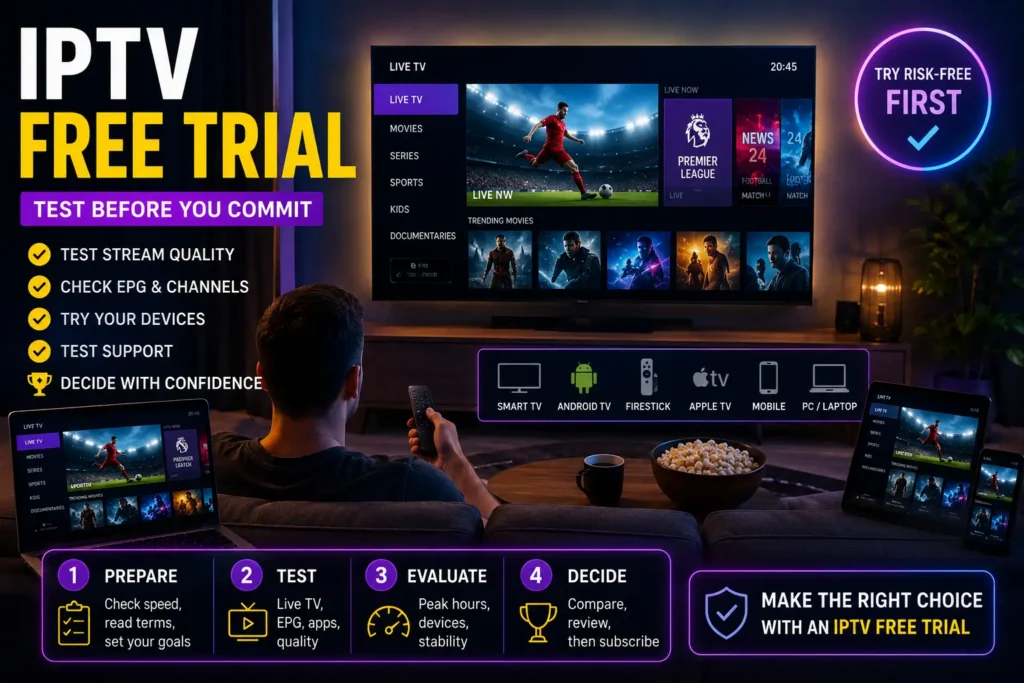
IPTV Free Trial UK: Test the Service Before You Commit
It’s just after 9 PM. The TV is on, everyone nearby seems to be online, and suddenly that flawless afternoon test matters a lot less.
This is when an iptv free trial becomes useful. Forget flashy menus for a moment. Switch between different types of content, leave something playing for a while and pay attention to the small things. Does the picture stay steady? Does navigation still feel quick? Does the app behave normally when your home network gets busy?
Support deserves a test too. Send a genuine question before you need urgent help. A clear reply now tells you far more than a promise of “24/7 support” on a sales page.
Most importantly, use the trial on the same television, connection and setup you’ll actually use later. You can explore the UK IPTV service first, but the decision should come from what happens on your own screen.

A good iptv free trial shouldn’t convince you with five perfect minutes. It should give you enough time to notice the imperfections before any money or longer commitment is involved.
Don’t Waste Your IPTV Free Trial Clicking Around
A trial can disappear surprisingly quickly. You open a few streams, everything looks fine, and suddenly you’re deciding whether to subscribe without having tested half the things that actually matter.
There’s a better way to use an iptv free trial.
Before activating anything, decide where you’ll watch most often, which device matters most and when your broadband is normally busiest. That gives you something useful to test rather than simply browsing for an hour.
Before the timer starts
Check how long the trial lasts and whether it ends automatically. If payment details are requested, read the renewal and cancellation terms first rather than assuming what happens when the test finishes.
Then prepare the actual devices you use at home.
Don’t borrow a newer television just to make the test look better. If there’s a five-year-old Smart TV hanging on your wall, that’s where the iptv free trial needs to prove itself.
For anyone setting up a player for the first time, the British IPTV installation tutorial covers the basic configuration without turning the process into a technical project.
Your first 20 minutes should look like this
Instead of jumping through dozens of streams, test a few things deliberately:
- Start something and leave it alone. Give playback enough time to reveal interruptions rather than changing after ten seconds.
- Move around the interface. Open different categories, return to the home screen and check whether navigation stays responsive.
- Try the EPG. Look at whether programme information loads properly and whether times appear correct.
- Restart the application. A player should reconnect without forcing you through the entire setup again.
- Come back later. The evening session is often more revealing than the first one.
That last point matters. An iptv free trial tested only once isn’t much of a trial.
Put your everyday devices through the same test
You don’t need to install the service on every screen you own. Pick the devices that genuinely matter.
Smart TV: focus on loading time, remote-control navigation and whether the app becomes sluggish after extended use.
Android TV or Google TV box: pay attention to navigation speed, EPG loading and how quickly the player recovers after switching content.
Apple TV: check whether your chosen player feels natural with the remote and whether browsing remains smooth.
Phone or tablet: switch between your home Wi-Fi and mobile connection if you expect to watch away from the television.
Laptop or desktop: useful as a second reference point. If playback struggles on the television but runs normally on the computer, the service may not be the problem at all.
Try a different player before blaming the trial
One poorly behaving app can give you the wrong impression of an otherwise functional setup.
Depending on your device, players such as OTT Navigator, IPTVX, GSE Smart IPTV or Kodi with a compatible IPTV client can provide quite different interfaces and playback behaviour.
You don’t need to test all of them. One alternative is enough.
If the same iptv free trial behaves poorly across two different players and two different devices, that result becomes much more meaningful.
The point isn’t to make the trial complicated. It’s the opposite.
Spend a little time testing deliberately now, and you’ll have far fewer unanswered questions when the trial clock reaches zero.

IPTV Free Trial Providers Worth Testing in Different Markets
Not every provider is built around the same audience. Instead of picking one from a long list of promises, use an iptv free trial to see how each option performs on the connection and device you actually use.
| Market | Provider | What I’d test first | Best test scenario |
|---|---|---|---|
| United Kingdom | BritishIPTVSub.com | Evening stability, EPG and app response | Main TV during peak hours |
| France | IPTVChaine.com | Navigation and consistent playback | Smart TV over home broadband |
| Canada | BestCanadaIPTV.com | Performance with a busy home network | Several household devices connected |
| United States | IPTV-NearMe.com | Longer playback and loading consistency | One continuous evening session |
| Sweden | BilligIPTV.com | Player compatibility and interface | TV or streaming box used daily |
| Italy | AbbonamentoIPTV4K.com | Picture consistency and device performance | Main living-room setup |
For UK viewers, I’d start with BritishIPTVSub.com and test it when the broadband connection is actually busy. If the iptv free trial performs well on your normal setup, you can compare the available IPTV subscription plans before deciding whether a paid period makes sense.
The same rule applies to every provider in the table. Don’t spend the whole trial jumping through content just to see what is available.
Leave something running. Switch categories. Open the EPG. Restart the player. Try another device. Send support a genuine question.
Most importantly, come back during the evening.
A useful iptv free trial should reveal how the service behaves when you would normally watch it, not just how impressive it can look during five carefully chosen minutes.
Whichever country you’re testing from, the winner should be the provider that works best in your own setup. That is a much better reason to subscribe than any oversized claim on a sales page.

Put Your IPTV Free Trial on the Clock
Most people test a service backwards.
They spend the first few minutes opening as many streams as possible, see that everything loads, and call it a success. That tells you something, but not nearly enough.
A better iptv free trial has three moments that matter: the first ten minutes, a longer uninterrupted session, and the evening test.
First 10 minutes: try to break the first impression
Start with the basics.
Open the app from scratch. Browse through a few different categories. Start something, return to the menu, choose something else and repeat the process several times.
You’re looking for little annoyances here:
- repeated login failures;
- menus that take too long to populate;
- streams that need several attempts to start;
- audio that arrives before or after the picture;
- an EPG that is empty or obviously out of sync.
Don’t panic over one slow load. Look for patterns.
You can use the available channel categories to choose a mixture of content for the test rather than checking the same type of stream repeatedly.
Minutes 10 to 40: stop touching the remote
This part sounds boring. That’s exactly why it works.
Pick something and watch it.
Constantly switching content can hide a problem that only appears after 15 or 20 minutes of continuous playback. Your iptv free trial needs at least one proper viewing session where you simply leave the player alone.
Watch for unexpected reconnects, gradual loss of picture quality, audio drift or interruptions that keep returning.
If nothing happens, good. Boring is exactly what you want from the technical side of television.
Before the first hour ends: leave and come back
Close the application completely.
Use the television for something else, then reopen your IPTV player. Check whether your account reconnects normally and whether the EPG and categories return without requiring another setup.
This small test tells you something that endless channel switching doesn’t: what the service feels like when used repeatedly rather than demonstrated once.
Then wait until the house gets busy
Your afternoon result is only half the story.
Come back between roughly 7 PM and 10 PM, when your own household is more likely to be using the connection normally.
Don’t disconnect everyone else just to protect the test. Let the laptop stay online. Let phones use Wi-Fi. If another person normally uses the internet at that time, let them.
Now repeat a few of the checks from earlier.
The question isn’t whether your iptv free trial becomes one second slower. You’re looking for a noticeable change in behaviour.
If afternoon playback was effortless but every evening session becomes unstable, write that down.
Change one thing at a time
Suppose the picture suddenly starts freezing.
Don’t immediately restart the router, change the player, switch Wi-Fi networks, clear the cache and modify five settings. If the problem disappears, you’ll have no idea what fixed it.
Instead:
Same stream, different device.
If it works elsewhere, investigate the original device or app.
Same device, different connection.
If Ethernet works while distant Wi-Fi struggles, the home network deserves attention.
Same setup, different time.
If problems repeatedly appear only during certain periods, that pattern is worth remembering.
Different player, same login.
If the issue disappears, the player may have been influencing the experience.
That makes an iptv free trial much more useful than a simple pass-or-fail test.
The final 15 minutes are for everything except watching
Before the trial expires, stop looking at the picture.
Open the EPG. Search for something. Check favourites. Restart the app. Look at the subscription terms. Confirm how many simultaneous connections the plan includes. Send support one sensible question if you haven’t already.
These are exactly the details people tend to investigate after paying.
Do them before.
By the end of a properly used iptv free trial, you shouldn’t just know that the service “works”. You should know how it behaves on your TV, on your broadband, during your evenings and with the people who actually share your home.
That is a much stronger reason to subscribe, or to walk away.

The Small Details That Decide Whether a Trial Is Actually Good
By this stage, you’ve already watched enough. There’s little value in spending another hour jumping between streams just to confirm that they open.
Now comes the more interesting part: deciding what your results actually mean.
An iptv free trial doesn’t need to be technically flawless every second to be useful. Home internet fluctuates. Apps occasionally need restarting. Even perfectly legitimate streaming platforms can have a bad moment.
What matters is whether problems are isolated or become a pattern.
One glitch is annoying. Three identical glitches tell you something.
Imagine the picture freezes once at 8:17 PM.
That alone tells you very little.
But if it happens again the following evening, on another device, at roughly the same busy period, you now have something worth investigating.
The same logic applies to loading times, audio sync and EPG information.
Instead of keeping complicated statistics, write down four things whenever something goes wrong:
When did it happen?
Note the approximate time.
Where did it happen?
TV, streaming box, phone or computer.
What happened?
Freeze, failed load, missing programme information or app error.
Did it happen again?
This is the important one.
Your iptv free trial becomes much easier to judge once you stop relying on memory.
Give Customer Support One Problem to Solve
Customer support pages always sound reassuring.
Testing one is more revealing.
If you notice a genuine issue during your iptv free trial, resist the temptation to send “not working” and nothing else.
Give support something they can actually investigate.
For example, tell them the approximate time, device, application and what you were trying to do when the problem appeared.
Then look at the response itself.
Did someone understand the question?
Did they suggest something relevant?
Did they ask for useful information?
Or did you receive a generic paragraph that barely addressed the problem?
Response time matters, but response quality matters more.
If you still have questions about setup, connections or account behaviour, the British IPTV FAQ is also worth checking before making your final decision.
Ask the boring questions now
This is also the right moment to clarify things that rarely seem important during the exciting first few minutes of a IPTV Free Trial.
Ask how many simultaneous connections your intended plan includes.
Check whether using the account on a second device is permitted.
Confirm which devices and player formats are supported.
Find out what happens when your subscription reaches its renewal date.
And if you use a VPN for general online privacy, ask whether it creates any compatibility issues with the service.
A useful iptv free trial should answer commercial questions as well as technical ones.
Your Trial Has Finished. What Does the Result Actually Say?
This is where I’d use the second and final table.
Not to compare Wi-Fi standards or list device specifications, but to turn what you observed into an actual decision.
| What happened during your test? | What it probably means | What I’d do next |
|---|---|---|
| Smooth playback with only an isolated hiccup | Normal real-world behaviour | Consider a short paid plan |
| Works well on one device but poorly on another | Device or player may be the issue | Fix the setup before judging the provider |
| Problems appear mainly on distant Wi-Fi | Home network deserves attention | Improve the connection and retest |
| Same fault repeats across devices | Service-side issue becomes more likely | Ask support to investigate |
| EPG repeatedly shows incorrect information | Programme data needs attention | Ask whether the guide can be corrected |
| Support gives clear, relevant answers | Good sign for future troubleshooting | Include this in your final assessment |
| Repeated faults plus unhelpful support | Two problems instead of one | Keep looking |
There is no magic score.
You’re looking for confidence.
If your iptv free trial worked comfortably during the way you actually watch television, and the few questions you had were handled properly, you have useful evidence for your decision.
If you spent most of the trial troubleshooting, that is useful evidence too.
Don’t Let the Expiry Timer Make the Decision for You
The final hour of a trial creates a strange pressure.
You’ve already invested time setting everything up, perhaps organised favourites and become familiar with the interface. Walking away can feel like wasting that effort.
It isn’t.
Before paying, forget the setup time and ask yourself three questions.
Would I be happy using this exact setup next month?
Did the service behave well when I actually wanted to watch?
If something goes wrong later, do I trust the support process?
Three comfortable yeses are more meaningful than any marketing claim.
If one answer is no, work out why before choosing a longer subscription.
That is the real purpose of an iptv free trial.
FAQ: Questions Worth Answering Before the Trial Ends
Is an IPTV free trial better than buying one month immediately?
They serve slightly different purposes.
A trial lets you check basic compatibility and performance with minimal commitment. A one-month plan gives you much longer to observe everyday behaviour.
If you have never used the provider before, an iptv free trial can be the sensible first filter. A short subscription can then be the second.
How long should I actually test the service?
Long enough to experience more than one viewing situation.
A few minutes can confirm that your login works. It cannot tell you much about consistency.
Use your iptv free trial at different times if its duration allows it, especially when your household would normally be watching television.
Should I test every available category?
No.
Choose a representative mixture of live content, films, series, news, documentaries or kids content depending on what your household genuinely watches.
Opening hundreds of streams wastes trial time without necessarily teaching you anything useful.
Which IPTV player should I use for the test?
Use a reputable player compatible with your device.
Options vary by operating system, so the best choice for an Android-based television may not be the best choice for Apple TV or another Smart TV platform.
More importantly, if something behaves strangely, testing your iptv free trial briefly with a second compatible player can help determine whether the first application is contributing to the problem.
Does buffering automatically mean the provider is bad?
No.
Buffering can originate from the service, your broadband connection, Wi-Fi interference, the viewing device or even the player itself.
Look for repeatable behaviour before reaching a conclusion.
Can I test on several devices?
Usually you can configure compatible devices, but that does not automatically mean the account permits several simultaneous streams.
Those are two different things.
Check the provider’s connection rules before trying to run the same iptv free trial simultaneously across multiple screens.
What should I check in the EPG?
Look at the basics: programme title, start time, upcoming programme and whether information appears consistently across the categories you use.
An occasional missing description is less important than a guide that is repeatedly empty or incorrectly timed.
Is picture resolution the most important test?
A sharp picture is obviously desirable, but consistency matters more during everyday viewing. Resolution labels mean little if playback repeatedly freezes or the device struggles to decode the stream.
Should I contact support even when everything works?
You don’t need to invent a technical problem.
Instead, ask a genuine pre-purchase question about compatibility, connections or subscription terms. It gives you a reasonable idea of how clearly the provider communicates.
That can be valuable information before an iptv free trial becomes a paid subscription.
What should make me walk away?
Repeated unexplained interruptions, unclear subscription terms, poor compatibility with the device you actually use, or support that cannot answer straightforward questions should all make you reconsider.
A trial exists precisely so you can discover those things before committing.
One Last Thought Before You Subscribe
A good trial doesn’t leave you impressed by a demo. It leaves you informed.
You know how the service behaves on your television. You’ve seen it during your normal viewing hours. You understand the connection rules. You know whether the EPG works for your needs and you have some idea of what happens when you ask for help.
That is enough.
If your iptv free trial passed those everyday tests, compare the subscription options calmly rather than rushing because access is about to expire.
If it didn’t, keep looking.
The few minutes spent making that decision are cheaper than spending months trying to convince yourself that an unreliable setup is “good enough”.
Copyright and lawful-use notice
IPTV is a method of delivering television and video over internet networks. Users should choose services that hold the appropriate permissions and distribution rights for the content they provide.
This website does not claim ownership of third-party copyrighted material and does not encourage unauthorised access to or redistribution of protected content. Rights holders with a legitimate copyright concern may contact the website operator for review.