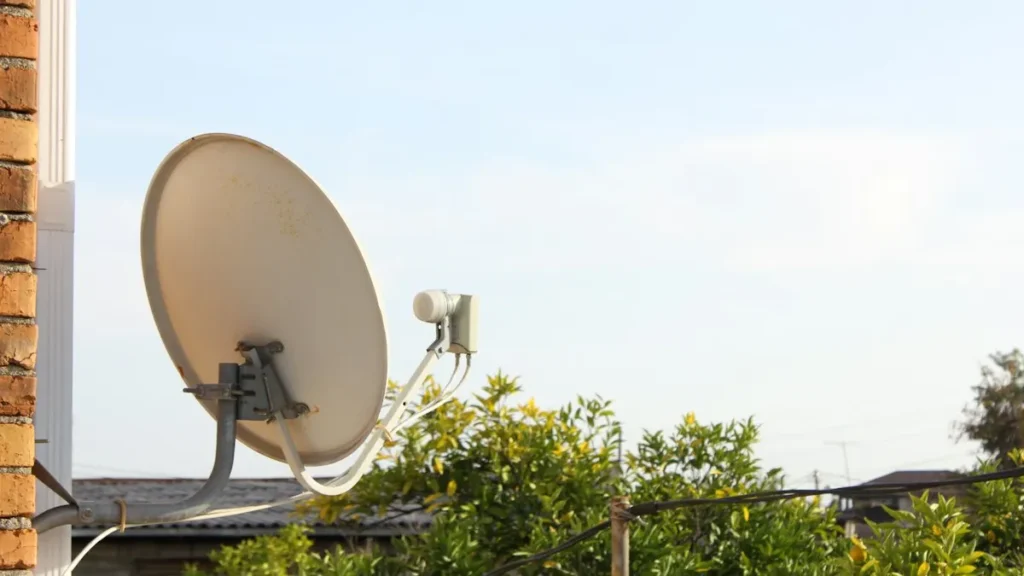
If there is already a satellite dish on your wall, you have a head start that aerial homes do not: free channels arrive without touching your broadband. The IPTV vs Freesat question is therefore narrower than it looks. It is about what the dish cannot do for you, and whether that gap is worth a subscription.
Three things usually decide it: whether your home has a working dish (or is allowed one), how reliable your broadband is in the evening, and which screens you actually watch on. We sell IPTV subscriptions at British IPTV Sub, so we have a stake in the outcome. Every Freesat fact below therefore comes from Freesat’s own pages, and every price of ours was checked on our pricing page on 4 November 2026.
IPTV vs Freesat at a Glance
Start with the short version, then read the sections that match your home. The Freesat column summarises Freesat’s published guidance; the IPTV column describes our own subscription.
| What matters | Freesat | Our IPTV plan |
|---|---|---|
| How TV arrives | Satellite dish | Broadband |
| Monthly fee | None | Paid plan |
| Main equipment | Dish plus Freesat box or TV | Smart TV, stick or box with a player app |
| Broadband | Only for On Demand players | 16 Mbps recommended |
| Recording | With a recordable box | Depends on provider and app |
| Phones and tablets | Not via the dish | Yes, with a player app |
Two rows do most of the work in any IPTV vs Freesat decision: broadband and screens. If your connection is weak, the dish wins by default. If you watch on tablets, bedroom TVs without a satellite cable or phones, the subscription starts to earn its cost.
Start With the Dish You Already Have
Many satellite homes in the UK were wired for Sky at some point. That matters, because Freesat’s equipment guide says you may be able to reuse an existing dish and that its latest 4K boxes “work with many UK satellite dishes”. If the dish is already up and pointing the right way, Freesat can cost little more than the box.
The same guide explains a detail that surprises people: the part on the front of the dish, the LNB, affects recording. Former Sky Q dishes with a wideband LNB can record up to four shows at once on Freesat’s recordable box, while dishes with a standard LNB, typical of Sky+, are limited to two.
So before weighing IPTV vs Freesat, find out what is on your wall:
- A working dish with cables into the house. Freesat is a low-cost option and worth keeping as a base layer.
- A dish that has been knocked, rusted or disconnected. You face an installer visit before Freesat works, which changes the cost comparison.
- No dish at all. Freesat now means buying and fitting one, plus checking whether you are allowed to, as covered further down.
Freesat’s help pages describe the service as subscription-free satellite TV with “over 100 TV and radio channels”, a figure that includes SD, HD, regional variants and radio. That is the free baseline any subscription has to improve on.
What an IPTV Subscription Changes
A subscription swaps the dish for a login. Your details arrive by email as an M3U link or Xtream Codes, you enter them in a player such as IPTV Smarters Pro, TiviMate or SmartOne, and the channel list and on-demand library appear in that app. Nothing needs to be mounted outside.
In an IPTV vs Freesat comparison, that brings three practical changes. Any screen that can run the app can watch, not just the one wired to the dish. The line-up is whatever the provider offers rather than the free satellite channels, so check what matters to you during a trial instead of trusting a headline number. And you pay for a plan length and a number of devices.
Our subscription prices, as displayed on 4 November 2026, split by how you order. For one device, online checkout: 1 month £9.99, 3 months £23.99, 6 months £34.99 and 12 months £49.99. For two devices, also online checkout: 1 month £18, 3 months £44, 6 months £66 and 12 months £95.
Larger households order through WhatsApp. Three devices: 3 months £61, 6 months £91, 12 months £134. Four devices: 3 months £90, 6 months £124, 12 months £182. Five devices: 3 months £103, 6 months £156, 12 months £229. These are the only figures we quote; the pricing page is always the reference before you pay.
What Freesat Asks You to Buy
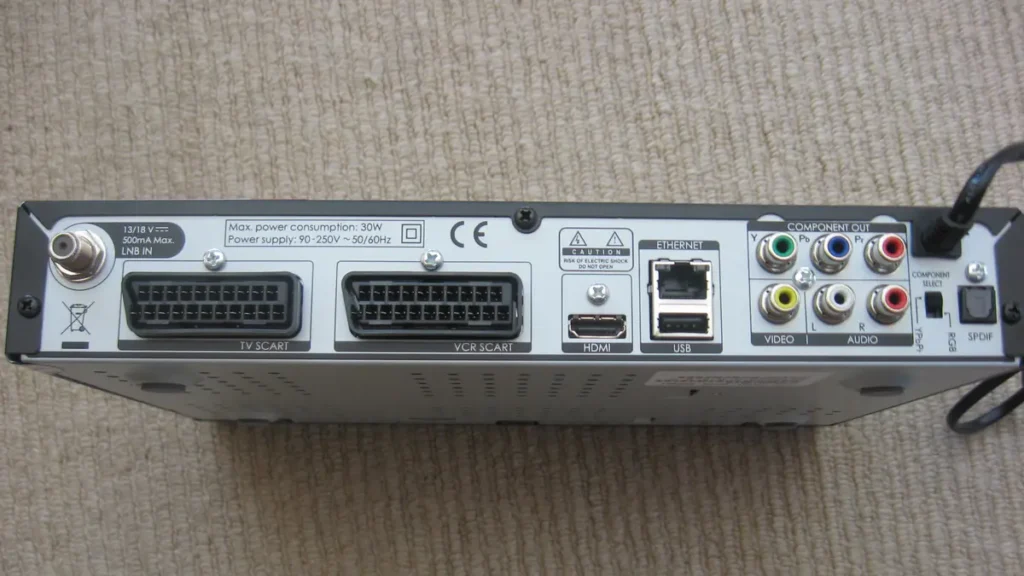
Freesat’s equipment guide lists four things: a satellite dish, a Freesat tuner (a Freesat TV or a set-top box), a spare HDMI port, and an internet connection, which is needed only for the On Demand players. Both its recordable and non-recordable 4K boxes are a one-off purchase with no monthly subscription.
The back of a Freesat box shows how the pieces join up. The satellite cable from the LNB goes into the box’s LNB input, an HDMI cable runs to the TV, and an Ethernet port or Wi-Fi connects the box to your router for catch-up. Live satellite channels never touch the broadband.
For the IPTV vs Freesat sums, that means Freesat is a purchase, while IPTV is an ongoing cost. Freesat’s guide does not give a dish price, and installer charges vary, so get a quote if you need a new dish rather than relying on figures quoted by sellers.
Adding Up the Real Costs Without Guesswork
Comparing a one-off purchase with a subscription is where most IPTV vs Freesat articles go wrong, usually by inventing a monthly figure for the dish. A fairer approach is to list what each route would actually cost in your home and get real quotes for anything you do not already own.
On the Freesat side, list:
- the Freesat box or TV for each room that will use the dish;
- an installer’s quote if the dish is missing, misaligned or damaged;
- any new cable runs or LNB change needed for extra rooms or for recording several programmes at once;
- an HDMI switcher if the TV is short of ports.
On the IPTV side, list:
- the plan, sized to the screens that watch at the same time, at the prices shown above;
- a streaming stick or box for any TV whose own apps do not support your chosen player;
- a broadband upgrade or an Ethernet cable if your connection cannot sustain 16 Mbps at the TV.
Put the two lists side by side and the IPTV vs Freesat answer often becomes obvious. A home with a working dish and one main TV has little to buy for Freesat. A home that would need a new dish, extra cables and a recorder for three rooms may find the subscription simpler.
Renters, Flats and Listed Buildings: The Dish Question
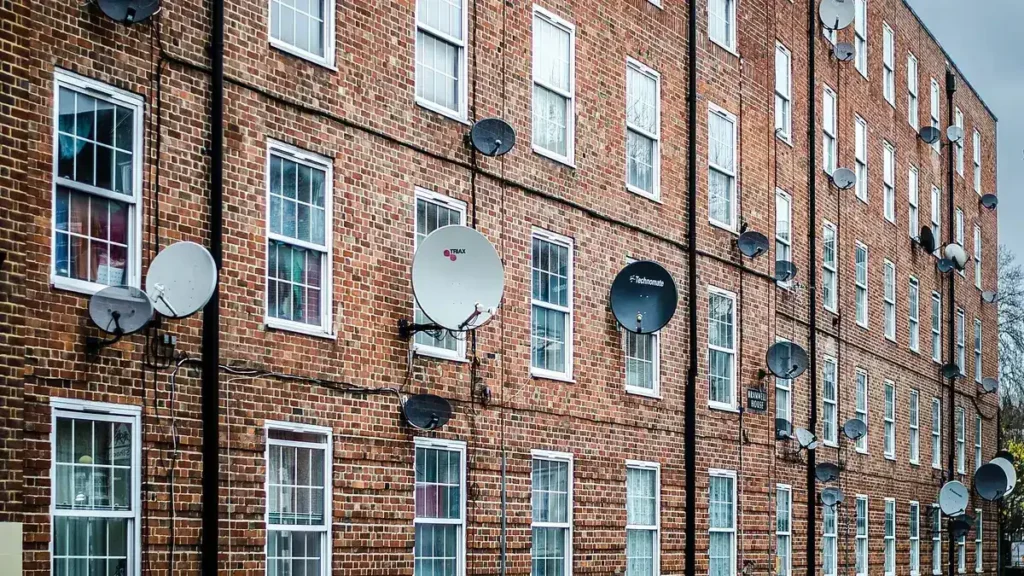
A dish is a fixture, and fixtures need permission more often than people expect. The Planning Portal, which covers England, says you should check whether you need planning permission, listed building consent, or permission from the landlord or owner before you buy or rent an antenna.
Its guidance adds three points that often decide IPTV vs Freesat for people in flats and older homes:
- Designated areas. Conservation areas, National Parks, Areas of Outstanding Natural Beauty, the Broads and World Heritage Sites have different rules.
- Listed buildings. These generally need listed building consent, which is separate from planning permission.
- Flats. The limits on antennas apply to the building as a whole, not to each flat, and once a building reaches its limit, further dishes need planning permission.
Rules in Scotland, Wales and Northern Ireland differ, so check with your council. If a landlord says no or the building is already full of dishes, the IPTV vs Freesat choice is effectively made for you: an app-based service needs only broadband and a socket for the stick.
Rain, Wind and Broadband: How Each One Fails
Neither route is perfect. What differs is how they let you down, and that is a fair way to judge IPTV vs Freesat for your own home.
Satellite trouble starts outdoors. A dish knocked out of alignment by wind, a corroded connector or a tired LNB can break up the picture or lose channels. Very heavy rain or snow can interrupt reception for a while. Fixes often mean a ladder or an installer.
IPTV trouble starts indoors. A slow or congested line, weak Wi-Fi at the TV, or a busy evening on the household network shows up as pausing and lower picture quality. Fixes usually mean moving the router, using Ethernet or upgrading the connection. Our step-by-step guide to IPTV buffering shows how to find which part is at fault.
Outages are the real divider. A broadband outage stops IPTV completely, while the dish keeps delivering live channels. Rural homes on slow or unreliable lines should weigh that heavily; it is the strongest argument for keeping Freesat even after subscribing.
Screens the Dish Cable Does Not Reach

Every Freesat screen needs its own Freesat tuner and a satellite feed from the dish. Adding a room usually means running another cable from the LNB, and an LNB with too few outputs may need changing. That is a job for an installer, not a setting.
Tablets and phones cannot use the dish at all. This is where IPTV vs Freesat stops being close for many families: a player app runs on the bedroom TV with a stick, the kitchen tablet and a phone, all from the same broadband connection.
Before choosing a plan size, count how many of those screens play at the same time on your busiest evening. Our guide to IPTV for multiple devices walks through that count, so you do not pay for slots that sit unused.
Recording and Catch-Up Work Differently
Freesat’s recordable box stores programmes on its own drive, and the number you can record at once depends on the LNB, as explained earlier. For households that build their week around recordings, that is a real strength.
With IPTV, catch-up and recording features depend on the provider and on the player app, and they vary between apps. Treat them as something to test, not assume. In the IPTV vs Freesat trade-off, recording usually favours the dish, while watching on any screen favours the subscription.
Picture quality follows a similar split. Freesat sells 4K boxes, but what you see in HD or 4K depends on what each channel broadcasts. With IPTV, it depends on the stream and on your connection at that moment, which is why a busy evening is the right time to judge it during a trial.
Moving Home, Second Homes and Holidays
A dish belongs to the building. Move house and you either inherit someone else’s dish, pay to have one fitted, or go without. A caravan, a holiday let or a student flat needs its own arrangement every time.
An app-based login is not tied to a dish, so the practical question becomes broadband at the new address and the provider’s terms on devices. For people who move often or rent, that portability is a quiet but important point in the IPTV vs Freesat comparison.
Running Freesat and IPTV on the Same TV
You do not have to give up the dish to try a subscription. The Freesat box sits on one HDMI port, a streaming stick or box sits on another, and the TV’s Source or Input button switches between them. Freesat’s guide suggests an HDMI switcher if your TV is short of ports.
Many satellite households settle on exactly this: free channels and recordings through the dish, and a subscription for the extra screens and content the dish cannot carry. It is often the most sensible answer to IPTV vs Freesat, because each route covers the other’s weak spot.
Whichever you use, GOV.UK says you need a TV Licence to watch or record live TV on any channel or service, or to use BBC iPlayer. That applies to satellite and broadband alike, and a subscription never changes your responsibility to watch content you have the right to watch.
Which Satellite Household Are You?
The rural home on a slow line. Keep Freesat as the main service. Add IPTV only if a trial runs smoothly at your busiest hour.
The former Sky household with a dish already fitted. Freesat is the cheap base layer. Add a subscription for the rooms and devices the dish does not reach, sized to the screens that watch at once.
The family with screens in every room. Keep the dish on the main TV for free channels and recordings, and let the subscription cover bedrooms, tablets and phones. In this household, IPTV vs Freesat is really a question of which screens each route serves.
The renter or flat dweller with no dish allowed. IPTV vs Freesat is not really a contest here; a broadband route is the practical option.
The home with an aerial instead of a dish. The comparison is a different one, and our IPTV vs Freeview guide covers aerials, Freely and the kit involved.
Test the Subscription Before Touching the Dish
Our homepage invites you to ask for a free trial on WhatsApp. Use it as a real IPTV vs Freesat test: watch at your usual time, on the screens you would use, with the rest of the household online. Check every channel you care about, and compare the picture with the same programme on the Freesat box. Our free trial guide lists what to look for.
Once you order, our FAQ says activation usually takes between 15 minutes and 6 hours after payment is confirmed. Our refund policy asks customers to report non-working login details within 48 hours of purchase, so test properly first and keep the dish connected until you are sure.
Questions Satellite Households Ask
Can I use my old Sky dish for Freesat?
Often, yes. Freesat says its latest 4K boxes work with many UK satellite dishes and that you may be able to reuse an existing one. A dish that has moved or corroded may need attention first.
Does IPTV need a dish?
No. A subscription runs over broadband through a player app. Our FAQ recommends at least 16 Mbps for stable streaming.
Is IPTV vs Freesat a choice between free and paid?
Partly. Freesat has no monthly fee but needs equipment and, if you have no dish, installation. A subscription has a regular cost but little equipment. Many homes use both rather than choosing one.
Which plan should a Freesat home start with?
Count only the screens that will use the subscription at the same time, not the TV already served by the dish, and start with a short plan before committing to a year.
The Dish Stays Until Broadband Proves Itself
Freesat is the dependable, low-cost layer for any home that already has a dish; its limits are the screens it cannot reach, the rules about where a dish can go, and the fact that it stays with the building. A paid subscription fills those gaps at a monthly or yearly cost, as long as the broadband can carry it. The fair answer to IPTV vs Freesat is to keep the dish connected, trial the subscription on the screens and evenings that matter, and only then pick the plan size that fits what the trial showed.